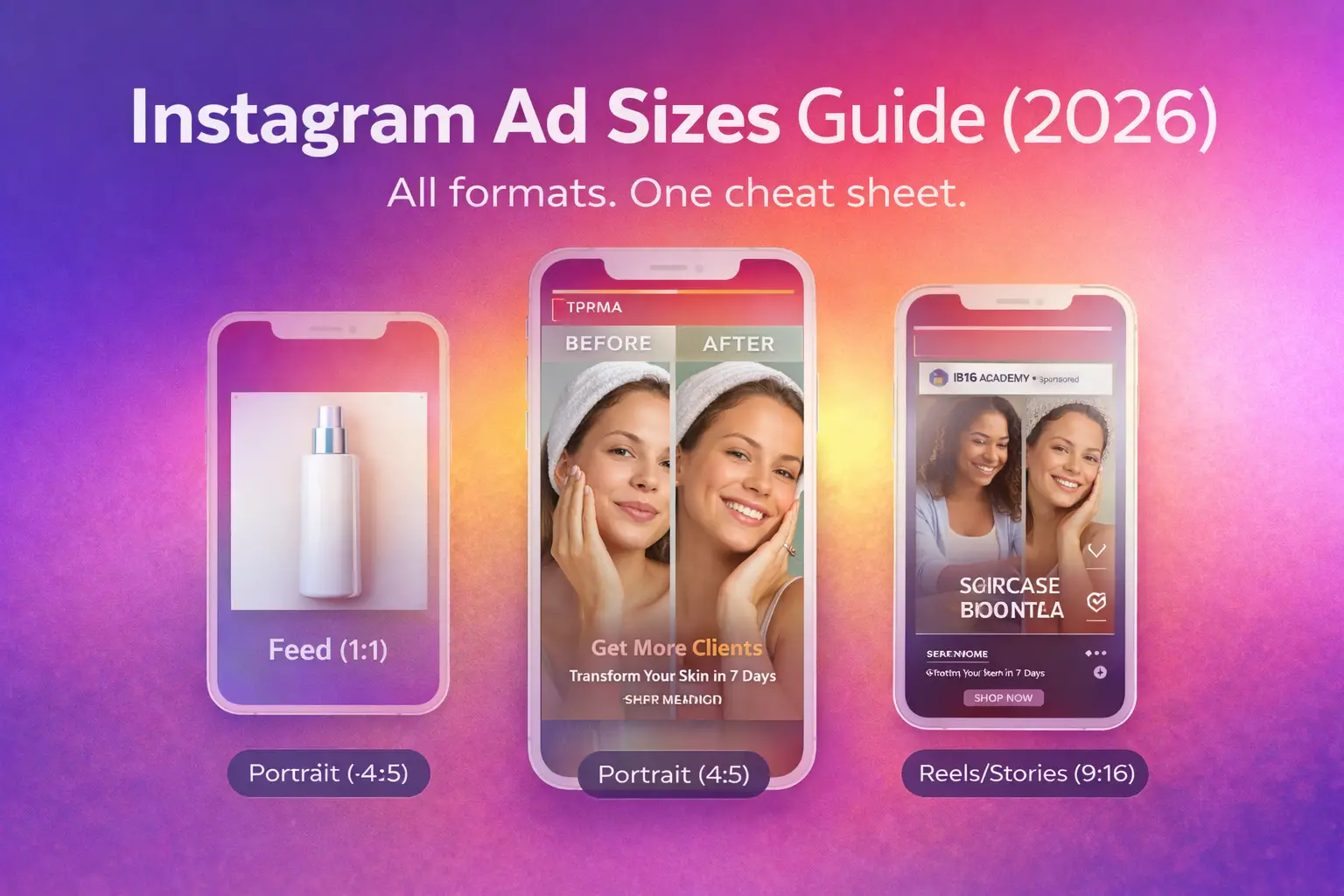
Everything you need to know about instagram ad image sizes — from Feed to Stories to Reels.
|
01 · QUICK REFERENCE
Instagram Ad Image Sizes: Quick Reference (2026)
Before we go deep, here’s your at-a-glance reference for every major instagram ad image size in 2026. Bookmark this, screenshot it, tattoo it on your wrist — whatever it takes.
| Placement | Recommended Size | Aspect Ratio | Max File Size | File Types |
| Feed – Square | 1080 × 1080 px | 1:1 | 30 MB | JPG, PNG |
| Feed – Portrait | 1080 × 1350 px | 4:5 | 30 MB | JPG, PNG |
| Feed – Landscape | 1080 × 566 px | 1.91:1 | 30 MB | JPG, PNG |
| Stories | 1080 × 1920 px | 9:16 | 30 MB | JPG, PNG |
| Reels (thumbnail) | 1080 × 1920 px | 9:16 | 30 MB | JPG, PNG |
| Explore | 1080 × 1080 px | 1:1 | 30 MB | JPG, PNG |
| Carousel | 1080 × 1080 px | 1:1 | 30 MB per card | JPG, PNG |
| Right Column (FB cross-post) | 1200 × 628 px | 1.91:1 | 30 MB | JPG, PNG |
|

02 · FEED ADS
Feed Ads: Square, Portrait & Landscape Specs
The Instagram Feed is where the highest purchase intent lives. Users are scrolling deliberately, unlike Stories which are more passive. Getting your instagram image ad specs right here is non-negotiable if you want to stop the scroll.
📐 Square Feed Ad (1080 × 1080 px | 1:1)
The 1:1 square format is the workhorse of instagram photo ads. It’s been the default since Instagram Ads launched and remains dominant for product photography, e-commerce, and simple CTA-driven ads. It occupies maximum vertical real estate in the feed relative to its width.
Best for: Product shots, testimonial graphics, promotional offers, brand awareness.
📐 Portrait Feed Ad (1080 × 1350 px | 4:5)
This is my personal favourite format for performance campaigns. The 4:5 portrait image takes up 33% more screen space than a square, meaning less competing content is visible around it. In 20 years of running instagram image ads, I’ve seen the 4:5 format consistently outperform 1:1 in direct response campaigns — often by 15-30% in CTR.
Best for: Direct response, lead gen, conversion campaigns, lifestyle imagery, UGC-style content.
⚡ PRO TIP:
When choosing between 1:1 and 4:5, I always test 4:5 first. More screen = more attention. Unless your creative is specifically designed to be square (like a logo-heavy brand ad), always start with portrait. The data almost always favours it.
📐 Landscape Feed Ad (1080 × 566 px | 1.91:1)
Landscape is the least-used feed format for a reason — it occupies the least vertical space in the feed. However, it works brilliantly for cinematic brand videos (as a thumbnail), vehicle ads, architecture, or any creative that has important information horizontally spread.
Best for: Brand storytelling, automotive, real estate, wide product shots.
| Format | Dimensions | Ratio | Screen Coverage | Best Use Case | |
| Square |
|
1:1 | High | Product, offers, e-commerce | |
| Portrait |
|
4:5 | ★ Highest | Direct response, lifestyle, UGC | |
| Landscape |
|
1.91:1 | Lower | Cinematic, brand awareness, auto |
⚠️ WATCH OUT:
Instagram will auto-crop your image if you submit incorrect dimensions. It crops from the centre which can cut off your product, your face, or your CTA. Always submit at exact spec. Never rely on auto-crop.
03 · STORIES ADS
Stories Ads: Dimensions and Safe Zones
Instagram Stories ads are arguably the most powerful placement in the entire Meta ecosystem. They’re full-screen, immersive, and cannot be scrolled past users must either watch or swipe. The instagram ad image size for Stories is 1080 × 1920 px (9:16 ratio). But the dimension is only half the battle.

Understanding the Stories Safe Zone
This is where 90% of advertisers make mistakes. You design a beautiful full-screen Stories ad product photo, headline, logo and then half of it gets covered by Instagram’s UI. The safe zone rule is simple but critical:
| Zone | Pixel Area | What’s Here | Your Content? |
| Top Zone | Top 250px | Progress bar, profile pic, username, mute/close buttons | ❌ AVOID |
| Safe Zone | 250px – 1580px | Your creative playground — image, headline, CTA | ✅ USE THIS |
| Bottom Zone | Bottom 340px | Swipe-up button, CTA overlay, story reply input | ❌ AVOID |
⚡ PRO TIP:
When I design Stories ads, I put a 250px invisible margin at the top and 340px at the bottom in Figma before placing any element. Your product, face, text, and logo must all live between these two margins. Test on a real device before publishing — always.
Complete Stories Ad Specs
| Spec | Requirement |
| Image Size | 1080 × 1920 px |
| Aspect Ratio | 9:16 |
| Minimum Width | 500 px |
| Maximum File Size | 30 MB |
| File Formats | JPG, PNG |
| Text Limit | No formal limit, but keep primary text under 125 characters |
| Safe Zone (top) | Avoid top 14% (~250px) |
| Safe Zone (bottom) | Avoid bottom 20% (~340px) |
04 · REELS ADS
Reels Ads: Size, Ratio and What Actually Works
Reels is Instagram’s highest-reach organic format, and Reels ads in 2026 are one of the most cost-efficient placements available. The image size for instagram ads on Reels follows the same 9:16 full-screen format as Stories.

| Spec | Reels Ad Requirement |
| Recommended Size | 1080 × 1920 px |
| Aspect Ratio | 9:16 (full screen) |
| Max File Size (image) | 30 MB |
| Max Video Length | Up to 90 seconds (video ads) |
| Minimum Resolution | 1080 × 1920 px recommended |
| Safe Zone (top) | Avoid top 14% |
| Safe Zone (bottom) | Avoid bottom 35% (more UI elements than Stories) |
| GIF Support | Yes — Instagram GIF ads supported via video format (MP4) |
⚠️ WATCH OUT:
GIF ads on Instagram: Instagram does not natively support the .GIF file format for ads. To run instagram ads gif style creatives, convert your GIF to MP4 using a tool like Ezgif or Adobe Express. Upload as a video ad. This also gives you better compression and quality.
⚡ PRO TIP:
Reels ads have more UI overlay at the bottom than Stories — the username, caption, audio credit, and action buttons stack up. Keep all key visual elements in the top 60% of the frame. I’ve seen too many brand logos sitting right behind the username. Don’t be that brand.
05 · EXPLORE ADS
Explore Ads: What You Need to Know
Instagram Explore ads appear after a user taps on a post in the Explore tab and then scrolls. This is a high-discovery, high-intent placement users are actively looking for new content and brands. The instagram image size for ads in Explore follows the same specs as Feed ads.
| Placement | Recommended Size | Ratio | Notes |
| Explore Grid | 1080 × 1080 px | 1:1 | Appears in the grid. Square dominates. |
| Explore Feed (after tap) | 1080 × 1080 or 1080 × 1350 | 1:1 or 4:5 | 4:5 portrait takes more screen in this view |
Explore ads don’t show the CTA button in the grid — only when the full post is opened. Design for impact first, CTA second. Bold visuals, high contrast, and minimal text work best for this placement because you’re competing with an extremely visually diverse grid.

06 · DESIGN TIPS
Design Tips Specific to Instagram’s Visual Style
Getting the instagram ad image size right is step one. Making that image actually convert is step two. Here are the design principles that have driven results across hundreds of campaigns I’ve managed:
1. Colour and Contrast are Your First Hook
Instagram is the most visually competitive social platform on earth. Your ad appears in a feed filled with professional photography, polished organic content, and other paid ads. In under 0.3 seconds, your image must signal ‘stop.’ High contrast backgrounds, bold typography, and unexpected colour combinations outperform ‘safe’ design every single time.
2. The 20% Text Rule is Dead — But Use Text Wisely
Meta officially removed the 20% text overlay limit in 2021. However, this doesn’t mean you should fill your instagram photo ad with copy. Instagram’s ad delivery system still penalises text-heavy images by limiting reach. Keep primary text overlay under 20% of your image area for best delivery performance.
| Text Amount on Image | Delivery Impact | Recommendation |
| No text / minimal logo | ★ Full reach | Best for reach campaigns |
| Some text (under 20%) | Normal reach | Fine for most ads |
| Moderate text (20–50%) | Reduced reach | Use with caution |
| Heavy text (50%+) | Significantly limited | Avoid for paid ads |
3. Design for Sound Off, Emotion On
Over 85% of Instagram users watch without sound — even Reels. Every instagram image ad and video thumbnail must communicate the core message visually. Facial expressions, motion blur, bold numbers (like ‘₹499’ or ‘50% OFF’), and sequential visual storytelling all work without audio.
4. Always Design Mobile-First
91% of Instagram users access it via mobile. Design your instagram ad image at full 1080px resolution in a mobile context. Check it on an actual device before publishing. What looks great on a 27-inch monitor can look cluttered on a 6-inch phone screen.
✅ Pre-Launch Instagram Ad Image Checklist
|
07 · VS FACEBOOK
Instagram vs Facebook Ad Sizes: Key Differences
One of the most common questions I get: ‘Can I use the same image for both instagram and facebook ad sizes?’ The answer is: sometimes yes, but often you’ll leave performance on the table if you do. Here’s the complete comparison.
| Spec Point | Shared? | ||
| Feed Square | 1080 × 1080 px | 1080 × 1080 px | ✓ Yes |
| Feed Portrait | 1080 × 1350 px | 1080 × 1350 px | ✓ Yes |
| Feed Landscape | 1080 × 566 px | 1200 × 628 px | ✗ Different |
| Stories / Reels | 1080 × 1920 px | 1080 × 1920 px | ✓ Yes |
| Carousel cards | 1080 × 1080 px | 1080 × 1080 px | ✓ Yes |
| Right Column | Not applicable | 1200 × 628 px | IG N/A |
| Marketplace | Not applicable | 1080 × 1080 px | IG N/A |
| Max File Size | 30 MB | 30 MB | ✓ Yes |
| GIF Support | Via MP4 only | Native GIF + MP4 | Different |
⚡ PRO TIP:
The key difference is landscape ads: Facebook uses 1200×628 for horizontal placements (right column, link previews), while Instagram uses 1080×566. If you’re running the same creative across both platforms, use 1080×1080 (square) — it works natively on both without cropping issues. This is the universal safe size for image size for facebook and instagram ads.
BONUS · CAROUSEL
Carousel & Collection Ad Specs
Carousel ads let you show 2-10 cards in a single ad unit. Each card can have its own image, headline, and CTA — making it perfect for product catalogues, step-by-step storytelling, or multi-benefit showcases.
| Spec | Carousel Ad |
| Image size per card | 1080 × 1080 px (1:1 recommended) |
| Number of cards | 2 – 10 cards |
| Max file size per card | 30 MB |
| File formats | JPG, PNG |
| Headline per card | Max 40 characters |
| Description per card | Max 20 characters |
| All cards same size? | Yes — consistency required |
How to Add a Photo to an Instagram Post / Ad
This section covers the practical mechanics — both for organic posts and for running paid promotions.
Adding Photos to Instagram Organic Posts
Tap the + icon → Select your image → Choose a filter → Write your caption → Add location and tags → Share. For multiple images in one post (carousel), select multiple photos before hitting next.
Adding an Image to an Instagram Ad (via Meta Ads Manager)
Go to Meta Ads Manager → Create Campaign → Choose Objective → Ad Creative → Upload Media. You can add images directly, use existing Facebook/Instagram posts, or pull from your asset library. Ensure your image is at the correct instagram ads image size 2026 spec before uploading.
Want to scale faster with paid ads? 👉 Dive into our Facebook Advertising Guide to learn what actually drives conversions.
Frequently Asked Questions
What is the best image size for Instagram ads in 2026?
The best image size for instagram ads in 2026 is 1080 × 1350 px (4:5 portrait) for Feed ads — it takes the most screen space and consistently outperforms square in direct-response testing. For Stories and Reels, use 1080 × 1920 px (9:16).
What is the image size for Facebook and Instagram ads?
The universal size that works across both platforms is 1080 × 1080 px (1:1 square). If you need platform-specific optimisation, use 1080×1350 for Instagram Feed and 1200×628 for Facebook landscape placements.
Can I use GIFs for Instagram ads?
Instagram does not support native GIF uploads for ads. To run instagram gif ads or instagram ad gif creatives, convert your GIF to MP4 and upload as a video ad. This is supported and works well.
What are instagram single image ad specs?
For a single image Instagram ad: minimum 1080px width, 1:1 (square), 4:5 (portrait), or 1.91:1 (landscape) aspect ratio, JPG or PNG format, max 30MB file size, and primary text under 125 characters.
What are pixel requirements for Instagram ads?
Minimum pixel width is 500px, but always target 1080px minimum for quality. Maximum dimensions: 1080px wide. For Stories and Reels: 1080 × 1920px. The term ‘pixel instagram ads’ typically refers to these pixel dimensions.
|