If you’re only optimizing for Google, you’re leaving a significant share of search traffic untapped. In 2026, Bing Webmaster Tools has emerged as one of the smartest, most underutilized platforms for gaining faster search visibility especially for websites in competitive niches.
This guide walks you through every step: from account setup and site submission to performance analysis and advanced ranking strategies. By the end, you’ll know exactly how to leverage Bing’s free SEO toolkit to drive consistent organic traffic.
Why Bing SEO Matters in 2026
Growth of Bing Search Traffic
Bing is no longer a backup search engine. In 2026, it powers critical digital touchpoints including:
- Microsoft Edge the default browser on hundreds of millions of PCs
- Cortana and Windows Search voice-driven queries growing year over year
- Microsoft Copilot and AI-powered search experiences
- ChatGPT-integrated web browsing (powered by Bing)
This ecosystem growth translates directly to keyword demand:
| Keyword | Monthly Searches | YoY Growth |
|---|---|---|
| bing webmaster tools | 18,100 | +50% |
| bing webmaster | 18,100 | +50% |
| bing search console | 1,600 | Stable |
| submit my site to bing | 1,000 | +20% |
| bing seo tools | 800 | +35% |
INSIGHT: A +50% YoY growth in searches for ‘bing webmaster tools’ signals that early adopters can capture rankings before competition intensifies. Source: Google Keywords Planner.
Low Competition Advantage
Compared to Google SEO, Bing offers a clear edge for smaller and niche websites:
- Less crowded SERPs fewer optimized competitors per keyword
- Faster indexing pages often appear in results within days
- Higher organic click-through rates in certain verticals
- AI-integrated results that elevate structured, well-optimized content
What is Bing Webmaster Tools?
Bing Webmaster Tools is a free platform provided by Microsoft that allows website owners to monitor their site’s health, analyze search performance, and improve visibility in Bing’s search results.
Think of it as Google Search Console but for Bing, with arguably more transparent data and faster feedback loops.
Core Features of Bing Webmaster Tools
- Search Performance Reports clicks, impressions, CTR, and average position
- SEO Analyzer on-page audit with actionable recommendations
- Keyword Research Tool real Bing search volume and trend data
- Backlink Insights domain-level and page-level link analysis
- Crawl Control set crawl rate and monitor crawl errors
- URL Submission instant indexing requests
- txt Tester validate blocking rules before deploying
Bing Webmaster Tools vs Google Search Console
| Feature | Bing Webmaster Tools | Google Search Console |
|---|---|---|
| Cost | Free | Free |
| Competition Level | Low | Very High |
| Ranking Speed | Faster | Slower |
| Data Transparency | High | Limited (sampled) |
| Keyword Research Built-in | Yes | No |
| AI Search Integration | Yes (Copilot) | Partial |
| Backlink Tool | Yes | No |
Step 1: Set Up Bing Webmaster Tools
Creating and Verifying Your Account
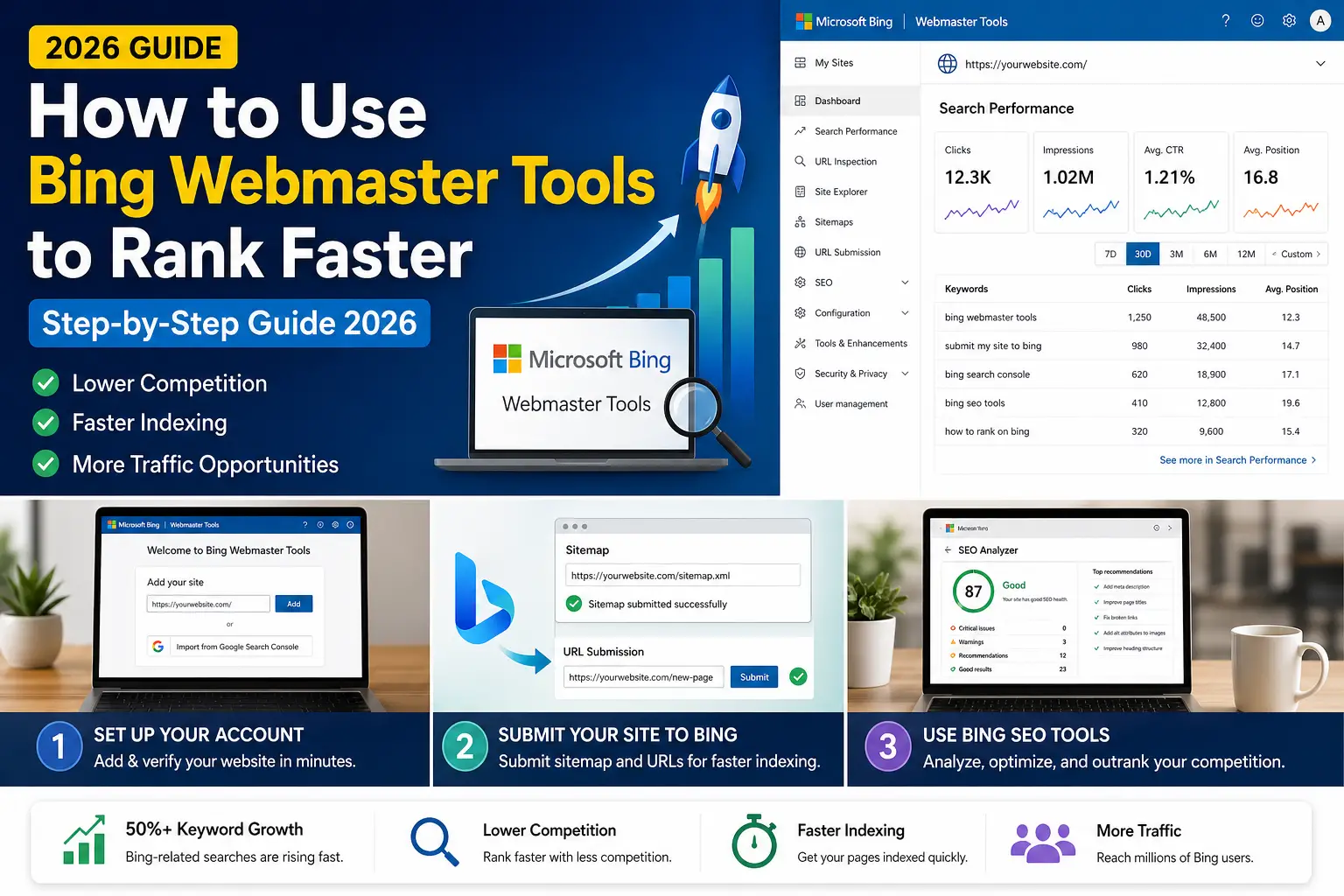
Getting started takes less than 10 minutes. Follow these steps:
- Go to binginwebmastertools.com and click Get Started
- Sign in with your Microsoft account (or create one for free)
- Click Add a Site and enter your website URL
- Choose a verification method:
- Option A — XML file upload (upload to your root directory)
- Option B — Meta tag in your HTML <head>
- Option C — CNAME record via your DNS provider
- Click Verify — once confirmed, your site dashboard activates
Importing Data from Google Search Console
⚡PRO TIP: Bing allows direct import from Google Search Console. This instantly populates your site’s pages, sitemaps and basic performance history — saving hours of manual setup.
To import:
- Go to Settings → Import from Google Search Console
- Authorize access to your Google account
- Select properties to import
- Click Import — data syncs within minutes
Step 2: Submit Your Website to Bing
The Submit My Site to Bing Process
Submitting your site ensures Bing’s crawlers discover and index your pages as fast as possible. Here’s the correct workflow:
- From your dashboard, navigate to Configure My Site → Sitemaps
- Enter your sitemap URL (e.g., https://yoursite.com/sitemap.xml)
- Click Submit Bing will begin crawling your submitted URLs
- Use URL Submission for priority pages that need immediate indexing

Why Sitemap Submission Matters for SEO
- Tells Bing exactly which URLs exist on your site
- Signals content priority and update frequency
- Reduces time to first index for new pages
- Improves crawl efficiency — fewer wasted bot requests
Step 3: Understand Bing Search Performance
Key Metrics You Need to Track
The Performance section in Bing Webmaster Tools gives you access to essential search data:
| Metric | What It Tells You | Optimization Action |
|---|---|---|
| Clicks | How many users clicked your listing | Improve CTR with better meta titles |
| Impressions | How often your site appeared in results | Target keywords with high impressions but low clicks |
| Avg. Position | Your average ranking for tracked queries | Optimize pages sitting in positions 5–15 |
| CTR (%) | Click-through rate per query | Rewrite meta descriptions for higher clicks |
Using Performance Data Strategically
- Filter by page URL to identify your highest-traffic content
- Filter by query to find keywords with high impressions but low CTR — these are quick wins
- Track position changes after on-page edits to validate your SEO impact
- Export data for monthly reporting or trend analysis
Step 4: Use Bing SEO Tools to Rank Faster
This is where most webmasters miss major opportunities. Bing’s built-in tools are powerful, free, and underused.
SEO Analyzer
The SEO Analyzer performs a detailed audit of any page on your site. It checks for:
- Missing or duplicate meta titles and descriptions
- H1 tag usage and keyword alignment
- Page load speed signals
- Mobile-friendliness issues
- Structured data / schema markup gaps
✅ACTION: Run the SEO Analyzer on your top 10 pages monthly. Fix each flagged issue, then recheck rankings within 2 weeks.
Keyword Research Tool
Unlike Google’s Keyword Planner, Bing’s tool is built directly into Webmaster Tools and shows real Bing-specific search volume. Use it to:
- Discover low-competition keywords your competitors are missing
- Identify question-based queries for featured snippet targeting
- Find seasonal keyword trends specific to Bing’s user base
Backlink Insights
Bing’s backlink report shows incoming links at both the domain and page level. Use this data to:
- Identify your highest-authority referring domains
- Spot toxic or spammy links that may hurt rankings
- Find link-building opportunities by analyzing competitor backlinks
Step 5: Fix Indexing & Crawl Issues
Diagnosing Crawl Errors
If your pages aren’t ranking, technical crawl errors are often the root cause. The Crawl section in Bing Webmaster Tools shows:
- 404 errors pages that return ‘Not Found’
- Server errors (5xx) pages that failed to load during crawl
- Redirect loops pages that bounce bots in an infinite cycle
- Blocked URLs pages accidentally blocked by robots.txt or noindex tags
🔧 FIX PRIORITY: Resolve 5xx server errors first (highest impact), then fix 404s by redirecting to relevant live pages, then clean up redirect chains.
Robots.txt Optimization
A misconfigured robots.txt file can accidentally block your most important pages. In Bing Webmaster Tools, use the Robots.txt Tester to:
- Verify that key pages (homepage, blog posts, product pages) are crawlable
- Confirm that admin areas, staging URLs, and duplicate content are blocked
- Test changes before pushing them live
Step 6: Optimize for Bing Ranking Factors
On-Page SEO for Bing
Bing’s algorithm is more literal than Google’s — it gives higher weight to exact-match keyword usage. Optimize with:
- Target keyword in the H1 tag exact match preferred
- Keyword in the URL slug keep it short and clean
- Meta description up to 160 characters with keyword + clear value proposition
- Image alt text that describes the image and includes relevant terms
- Structured data (Schema.org) for articles, FAQs, and products Bing actively uses these for rich results
Off-Page SEO Strategy for Bing
Bing places strong emphasis on traditional authority signals. Focus on:
- Backlinks from .edu and .gov domains trusted by Bing’s algorithm
- Domain age and consistent publishing history
- Social signals Bing has acknowledged that social shares influence rankings
- Brand mentions even without a hyperlink Bing tracks co-occurrences
Advanced Bing SEO Strategy

Content Optimization for AEO (Answer Engine Optimization)
With Bing powering Microsoft Copilot and AI search, AEO is now essential. To get your content surfaced in AI-driven answers:
- Structure content with clear questions as subheadings (H2/H3)
- Provide concise, direct answers in the first 2–3 sentences after each heading
- Add an FAQ section — AI engines pull directly from structured Q&A content
- Use Schema.org FAQPage and Article markup
- Keep sentences short and factual — AI prefers scannable, high-confidence content
Low Competition Keyword Targeting
The fastest path to Bing rankings is targeting long-tail, low-competition keywords. Examples based on your current keyword set:
- how to use bing webmaster tools for beginners
- bing webmaster tools step by step tutorial
- how to submit sitemap to bing webmaster
- bing seo vs google seo comparison
- fix crawl errors in bing webmaster tools
💡 STRATEGY: Create one dedicated blog post per long-tail keyword. These rank in 2–4 weeks on Bing and build cumulative topical authority over time.
Keyword Growth Insights: The Opportunity Window
Your keyword dataset reveals a rare alignment in SEO:
| Signal | Status | Opportunity |
|---|---|---|
| Search demand | Rising (+50% YoY) | High |
| Competition level | Low | Very High |
| AI search integration | Active (Copilot + ChatGPT) | High |
| Content saturation | Low | Wide open |
| Cost to rank | Near zero | High ROI |
This combination growing demand, low competition, AI integration, and near-zero cost is extremely rare in SEO. The window is open now, but it won’t stay open indefinitely.
Frequently Asked Questions
Q1. How to use Bing Webmaster Tools effectively? Start by completing your account setup, verifying your site, and submitting your sitemap. Then use the SEO Analyzer and Keyword Research tool weekly to find and fix optimization gaps.
Q2. Is Bing SEO worth it in 2026? Yes, lower competition, faster ranking timelines, and growing traffic from the Microsoft-AI ecosystem make it a high-ROI channel for most websites.
Q3. How do I submit my site to Bing? Log into Bing Webmaster Tools, add your site, verify ownership, then go to Configure My Site → Sitemaps and enter your sitemap URL.
Q4. What is Bing Search Console? It’s a common alternative name used for Bing Webmaster Tools. They refer to the same platform.
Q5. How fast can you rank on Bing? For low-competition long-tail keywords, rankings can appear within 7–21 days after submission and on-page optimization.
Q6. Are Bing SEO tools free? Yes. All tools inside Bing Webmaster Tools including the SEO Analyzer, Keyword Research Tool, and Backlink Insights are completely free.
Want Expert Help Setting Up & Auditing Bing Webmaster Tools?
Reading a guide is one thing, actually executing it correctly across your site is another. That’s where 3percent.in comes in.
At 3percent.in, we specialize in complete Bing Webmaster Tools setup, technical audits, and ongoing performance analysis — so you get rankings, not just reports.
Here’s what we do for you:
- Full Bing Webmaster Tools setup & verification (including Google data import)
- Sitemap submission + crawl health audit
- Keyword gap analysis using Bing’s native data
- Page-by-page SEO Analyzer review with a prioritized fix list
- Backlink profile audit and disavow recommendations
- Monthly performance tracking with data-driven recommendations
- AEO optimization, structuring content for Bing Copilot and AI search surfaces
⚡3% Collective: We audit your site, set up Bing Webmaster Tools, analyze your keyword and performance data, and deliver a clear action plan — so you can start ranking faster without guesswork. Visit 3percent.in to get started today.
Whether you’re starting from scratch or want to unlock more value from an existing setup, our team provides the same structured, data-backed approach outlined in this guide, applied directly to your website.
Conclusion
Bing Webmaster Tools is one of the most underutilized platforms in digital marketing. While competitors focus exclusively on Google, smart marketers are quietly building rankings on Bing faster, cheaper, and with less effort.
By following this six-step blueprint,setting up your account, submitting your site, analyzing performance data, using Bing’s built-in SEO tools, fixing technical issues, and optimizing for Bing’s ranking factors you position your website ahead of the curve.
The AI search revolution is accelerating. Bing is at the center of it. And the time to act is now, before this opportunity becomes as competitive as Google.